What Is Foreground Syncs in Messages App
Foreground syncs in the Messages app means your phone updates messages in real time while the app is open and active on your screen. When you’re reading or typing messages, Android allows the app to sync immediately so new texts appear without delay.
In simple terms: foreground sync keeps your conversations live while you’re using them. It’s not spying. It’s not mirroring. It’s just how Android prioritizes active apps so they work smoothly.
This setting matters because it affects battery use, data usage, and message delivery speed. Most confusion comes from seeing “foreground activity” in phone settings without context. Let me explain what’s actually happening.
Quick facts:
| What it refers to | Real-time syncing while Messages is open |
|---|---|
| When it runs | Only when the app is on screen |
| Battery impact | Small and temporary |
| Data usage | Minimal for text messages |
| Security risk | None by default |
| Safe to turn off | Yes, but with trade-offs |
What foreground sync means on Android
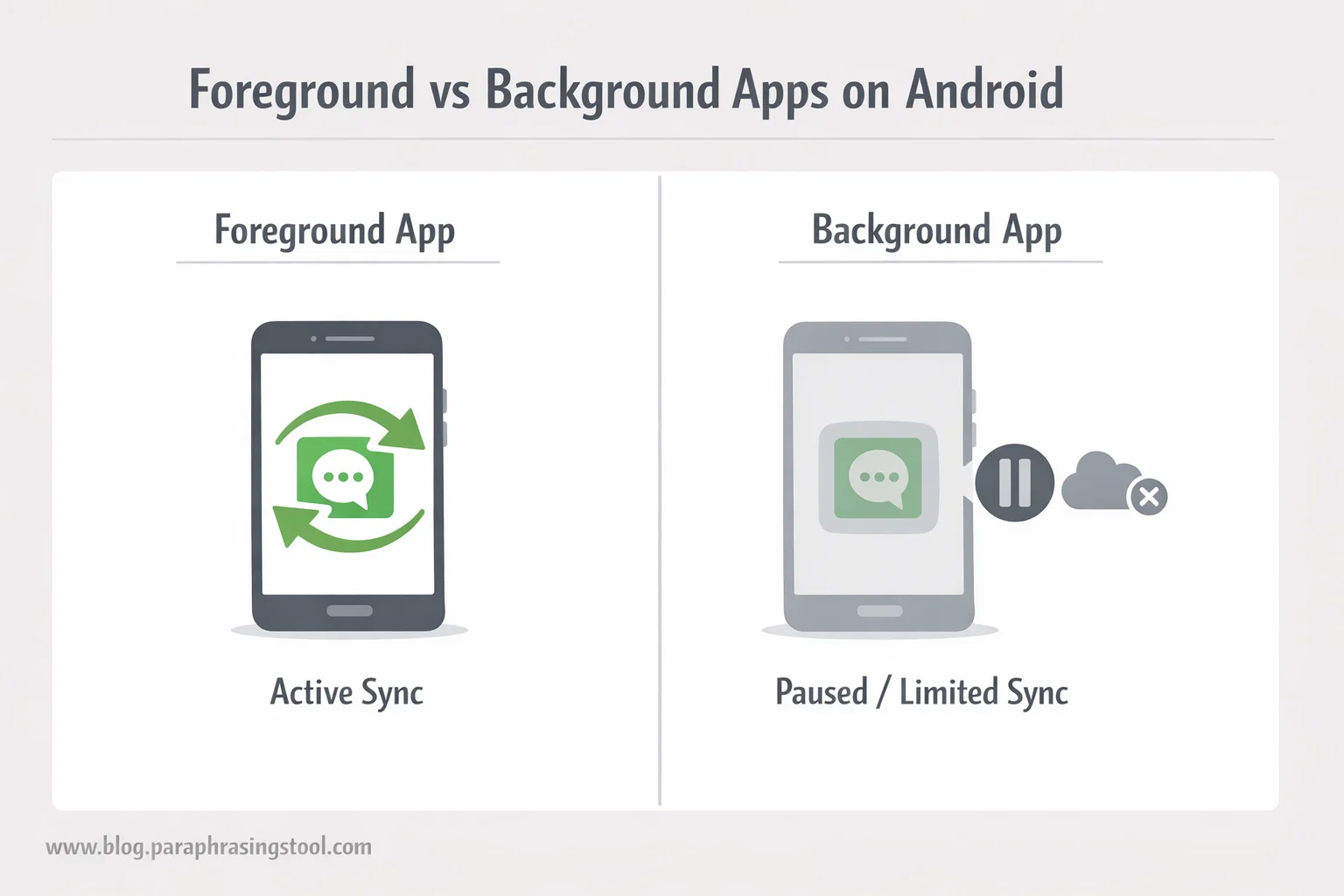
On Android, apps operate in two main states: foreground and background.
Foreground means the app is visible and you’re actively using it.
Background means it’s running quietly or paused while you use something else.
When the Messages app is in the foreground, Android allows it to:
- Check for new messages instantly
- Sync message status like sent, delivered, or read
- Update conversations without delay
A clear way to think about it: foreground sync is permission to work normally while you’re watching.
This behavior is standard across Android, whether you’re using Android itself or apps built for it.
What syncing messages actually does
Syncing messages means your phone keeps message data consistent and up to date.
While the app is open, syncing:
- Pulls in new incoming texts
- Updates outgoing message status
- Keeps conversations aligned across features like search or backup
If you’re using Google Messages, syncing also supports features like RCS chat indicators and message reactions.
A calm, quotable truth: syncing doesn’t read your messages, it just keeps them current.
Foreground sync vs background sync
This is where most people get stuck.
Foreground sync
- Happens only when the app is open
- Fast and responsive
- Short-lived
- Uses a small amount of battery
Background sync
- Runs when the app is closed
- May be delayed to save power
- Can be restricted by Android
- More tightly controlled by battery optimization
Foreground sync is less risky for battery than background sync because it stops the moment you leave the app.
That’s why Android allows it by default.
Does foreground activity drain battery?
Yes, but only slightly and only while you’re using the app.
Foreground activity uses:
- Screen power (the biggest drain)
- A small amount of processing
- Minimal network access
In real use, the battery impact of foreground sync in Messages is negligible compared to things like video, games, or navigation apps.
Observed behavior across devices shows that disabling foreground activity doesn’t meaningfully improve battery life unless the app is misbehaving, which is rare for system messaging apps.
What does “foreground data usage” mean?
Foreground data usage refers to internet or mobile data used while the app is open.
For messaging apps, this usually includes:
- Sending and receiving texts
- Syncing delivery status
- Loading message attachments if you open them
Text messages themselves use almost no data. Even chat-based apps like WhatsApp consume very little data during foreground use unless media files are involved.
Bottom line: foreground data usage for messages is not something most users need to worry about.
Should you allow foreground activity for Messages?
For most people, yes.
Allowing foreground activity means:
- Messages arrive instantly while you’re chatting
- No delays in delivery confirmation
- Fewer glitches or “message failed” errors
Turning it off can cause:
- Delayed message updates
- Messages appearing only after reopening the app
- Inconsistent chat behavior
A grounded recommendation: leave foreground activity on unless you’re troubleshooting a specific issue.
What happens if you turn off message sync?
If you disable sync for the Messages app:
- New messages may not appear right away
- You might miss real-time notifications
- Conversations can feel laggy or incomplete
On phones from brands like Samsung, this can also affect features tied to Samsung’s own Messages app and cloud services.
Sync is the backbone that keeps messaging reliable. Turning it off doesn’t break your phone, but it removes the safety net.
Can someone mirror or spy on your messages using foreground sync?
No.
Foreground sync does not:
- Share messages with other devices
- Allow remote viewing
- Enable spying or monitoring
Mirroring messages requires:
- Account access
- Device pairing
- Explicit permissions
Foreground sync is a system-level performance setting, not a surveillance feature. If someone is seeing your messages elsewhere, the cause lies in account access or linked devices, not this setting.
How to stop an app from using foreground activity
If you still want control, Android gives you options.
You can:
- Restrict background activity (safer option)
- Limit data usage
- Disable notifications instead of sync
Completely disabling foreground activity for core apps like Messages often causes more problems than it solves. A smarter move is to manage background behavior while leaving foreground use untouched.
Who this setting is not for
You should be cautious about changing this if:
- Messages are your primary communication tool
- You rely on instant delivery for work or family
- You’re not troubleshooting a real problem
A common mistake is turning off sync to “save battery” and then blaming the phone when messages arrive late. That’s not a bug. It’s the expected outcome.
Final takeaway
Foreground syncs in the Messages app simply lets Android update your texts instantly while you’re using the app. It’s normal, safe, and designed to make messaging feel responsive.
If you want reliable conversations, keep it on. If you’re chasing battery savings, look elsewhere. This setting isn’t the drain people think it is.
Your phone is doing exactly what it should.
FAQs
What is a foreground sync?
Foreground sync means an app updates data while it’s open and active on your screen. For messages, this ensures new texts appear instantly when you’re using the app.
Should I allow foreground activity on my phone?
Yes, for essential apps like Messages. Foreground activity keeps the app responsive and prevents delays. Turning it off often causes more problems than it fixes.
What does it mean to foreground an app?
Foregrounding an app means it’s currently visible and in use. Android prioritizes it for speed, syncing, and smooth performance.
What does syncing messages mean on Android?
Syncing messages keeps conversations updated. It handles incoming texts, delivery status, and chat consistency while you use the app on Android.
Can someone mirror my text messages through foreground sync?
No. Foreground sync does not mirror, share, or expose your messages. Mirroring requires account access or device linking, not sync settings.
What does syncing messages actually do?
It updates message content in real time, ensures delivery status is accurate, and keeps chats consistent across features like search or backup.
How do I stop an app from using foreground data?
You can limit background data or notifications in settings. Fully blocking foreground data is not recommended for messaging apps.
Does foreground activity drain the battery?
Slightly, but only while the app is open. The impact is minimal compared to videos, games, or navigation apps.
What does foreground mean on my phone?
Foreground means the app is active and visible. Android allows it to use resources temporarily so it works properly.
How do you disable a foreground service?
Some system services can’t be fully disabled without affecting functionality. You can restrict background activity instead, which is safer.
What is foreground data usage in WhatsApp?
It’s data used while WhatsApp is open, such as sending messages or loading media. Text messages use very little data.
What is the difference between background and foreground apps?
Foreground apps are open and prioritized. Background apps run quietly with limited access to power and data.
What are the two types of messages on Samsung phones?
On Samsung devices, messages typically include standard SMS/MMS and chat-based messages (RCS), depending on the app used.
What will happen if I turn off sync?
Messages may arrive late, delivery status may not update, and conversations can feel unreliable.
Is it okay to turn off background apps on Android?
Yes, for non-essential apps. For core apps like Messages, background limits are fine, but foreground sync should usually stay on.

Chris Digital, tech enthusiast and digital marketer, shares insights on WordPress, SEO, Adsense, online earning, and the latest in graphics and themes.